
Mengedit Script wp-config.php #
1. Login ke cPanel, masuk ke File Manager.
2. Masuk ke public_html, cari file wp-config.php, kemudian klik kanan dan pilih Edit.
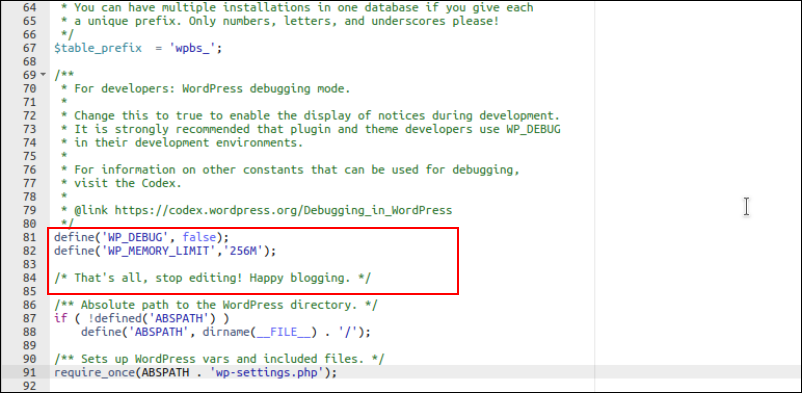
3. Cari baris yang bertuliskan ‘That’s all, stop editing! Happy blogging.’ Tepat di atasnya, tambahkan parameter sebagai berikut :
define( 'WP_MEMORY_LIMIT', '256M' );
Ukuran memory bisa disesuaikan, sesuai dengan kebutuhan dari plugin yang ingin Anda instal. Sebagai contoh, di sini ingin menambah alokasi memory sebesar 256MB.
1 komentar
spotbet
Great article.
spotbet
Simply desire to say your article is as amazing.
The clearness on your put up is simply cool and i can assume you’re knowledgeable in this
subject. Fine along with your permission let me to snatch your RSS feed to keep
updated with drawing close post. Thank you a million and please carry on the enjoyable work.
spotbet
I’m gone to tell my little brother, that he should also pay a
visit this blog on regular basis to obtain updated from most recent news update.